
To open a new Cash App account, download the app on your mobile device from https://cash.app or visit the CASH APP website to sign up with your contact details or visit for more instructions: https://cash.app/help/us/en-us/6485-getting-started-with-cash-app
Cash App Setup Instructions
- Download and open: Get the app from the Apple App Store, Google Play Store, or go to the Cash App website and select sign up.
- Enter contact info: Input your phone number or email address.
- Submit confirmation code: Type in the unique verification code sent to your phone or email.
- Add a debit card: Enter your Visa, MasterCard, or Discover debit card details, or choose to skip this step to add one later. If you choose to pay using a Credit card then you can add your Credit card information, however, remember Cash App requires that you to add a debit card first to set up your account then you can add additional cards such as your Credit card
- Provide personal details: Type in your full legal first and last name along with your date of birth.
- Choose a $Cashtag: Pick a unique username used to send and receive money.
- Enter zip code: Provide your local billing or residential zip code.
- Create a PIN: Set up a 4-digit security PIN for account safety and transaction
After you finish setting up your Cash app account, you can make your payment to EVMI at:
or scan:

or you can email your $Cashtag to certification@evmi.com
and EVMI will send you a payment request and will also send you the unique transaction code that is associated with your payment transaction
Some common issues when making payments for the first time:
- Cash App may issue a warning that it is a scam alert when making your payment to EVMI for the first time so make sure that you are making the payment to $evmievmi and then accept the payment
The alert looks like something this and this is a security feature built into Cash App especially for first time users:
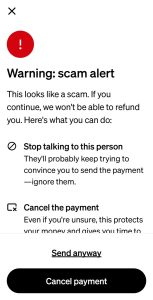
After you have verified 100% that you are paying to: https://cash.app/Sevmievmi go ahead and click: Send anyway
2) Additionally, if asked for EVMI’s last 4 digits of our phone use 4066 from our phone number: 469.920.4066